

Etsy is one of the top marketplaces to sell products online, but with over 8 million active sellers, there’s a lot of competition. It’s hard to stand out in the crowd. You need the right tools for the job. That’s where eRank comes in – or does it? If you’re just starting your shop or feel stuck in a rut with sales, you’re probably wondering whether this tool can help you. I’m going to share my personal thoughts and experiences in this honest eRank review.
What is eRank and How Does it Help You?
eRank is a research and optimization tool designed to help Etsy sellers:
- Optimize their product listings
- Find high-performing keywords
- Analyze sales data
- More
To kick off this eRank review, let’s explore this tool’s features and whether or not they help you.
Keyword Research
One of the most helpful tools on eRank is the keyword research tool. It helps you find potential profitable keywords and can be a great source of inspiration for new product ideas.
Ultimately, if you want to increase your sales on Etsy (or land your first sale), you need to offer products people are looking for and optimize your listing for these keywords.
Optimization is what will help your shop and products show up in Etsy’s search results.
eRank’s keyword tool is pretty in-depth.
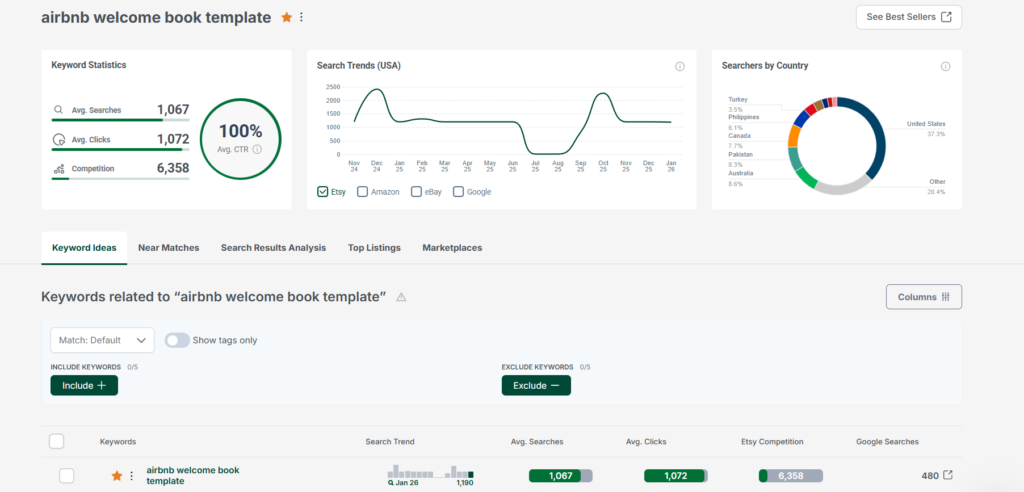
For this keyword, we can see the average searches, average clicks and competition. You can also view search trends, where people are searching from and more.
You can also view keywords related to the one you searched for, and you have the option to include or exclude additional keywords in this spot of the dashboard.
eRank shows you some interesting metrics, but average searches and Etsy competition are the most important for sellers. Why? You want to focus on products with a lot of searches and low competition.
These products will be easy to rank for, which leads to more sales.
eRank helps you decide whether a keyword is worth focusing on. For example, highly competitive search terms have red bubbles instead of green.
The keyword research alone can help you boost sales. But my biggest issue with this feature is that it’s only super useful if you have an active subscription. On the free tier, I can only see the first related keyword on the list.
You’re also limited to just 5 searches per day (a few years ago, it was 10).
Along with a direct keyword research tool, you’ll also find:
- Bulk keyword tool, where you can search for multiple keywords at once
- Keyword lists, where you can save search terms you want to focus on
- Rank checker to see where your keywords rank for in Etsy
Competitor Research
Keywords are important, but so is scoping out the competition. If you’re a new Etsy seller or you want to branch into a new product category, it’s useful to see how many sales other sellers are making, what they’re offering and other information.
With eRank, you can see:
- The top sellers on Etsy
- Competitor sales, so you can compare your shop with other shops you specifically choose
- Shop Info, which allows you to see important statistics, like where it ranks in search.
- Category report to see what’s selling and who’s buying in Etsy’s categories.
The category report and shop info tools are, in my opinion, the most useful for sellers. They give you insights into what’s selling and what your competitors are offering.
Otherwise, viewing the top sellers really isn’t useful – except for motivation. Competitor sales can be helpful, but you may not know which shops to compare yourself against, which can make it more challenging to use this tool.
Listing Optimization
We know that keywords really matter on Etsy, so that’s why the listing optimization tool is so useful for sellers.
eRank gives you access to quite a few tools in this category:
- Listing management. Here, you can see your active, drafted, expired and sold out listings all from one place.
- Health Check, which allows you to audit your listings and gives recommendations on how to improve them.
- AI Listing Helper, which allows you to generate titles, tags and descriptions in seconds.
- Compare Listings, where you can compare different listings across performance, pricing, categories and tags to find opportunities.
Personally, I find the Health Check tool to be really useful.
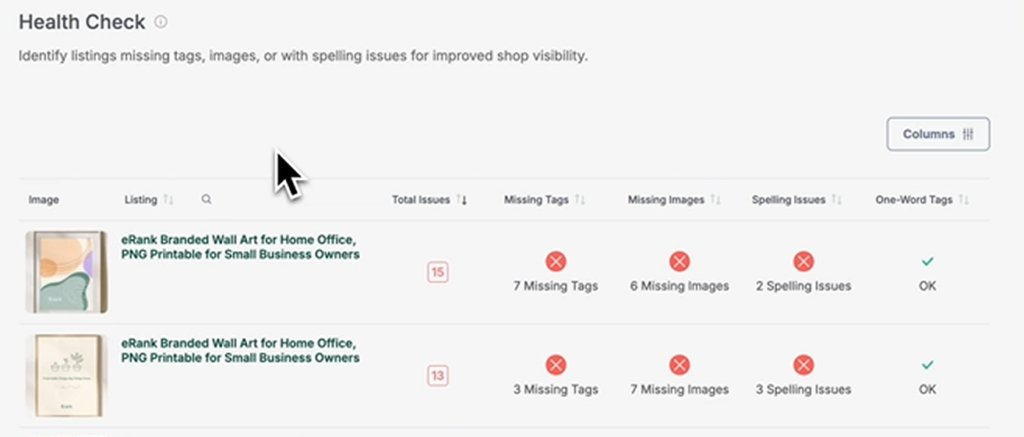
It gives you a bird’s-eye view of your listings, but you can also see things on a more granular level. As you can see in the example above, these listings are missing tags and images and have spelling errors that are affecting their rankings.
If you click the Audit Listing button, eRank will then give you more details, like:
- Total views
- Daily views
- Monthly views
- Sales
- Conversion rate
- Favorites
- Listing tags (along with their search volumes, clicks, click-through rates and competition data)
eRank gives you hints on how to improve each area of the listing. For example, if you don’t have your title keyword as a tag, it will recommend that you add it.
It will also make suggestions for your description, images and other areas of your listing.
The Health Check tool is easily one of my favorites for optimizing listings. If you’re not getting sales for your existing listings, the suggestions here can make a big difference.
The comparison tool is another great helper if you want to explore new opportunities or see what’s working for other people. For example, if you and a competitor have similar products, you can see which tags they use or prices they’re setting. Little tweaks to your listing in these key areas may make all the difference in boosting your sales.
Here are a few interesting case studies of Etsy sellers who successfully optimized their listings to grow their sales on Etsy:
I Doubled My Etsy Sales with These Simple Tips
This Weird Etsy Shop Makes Six Figures a MONTH 😲
This Toy Maker Makes Over $20k per Month on Etsy, Here Is How…
Shop Insights
The Shop Insights tools give you insights into how your listings are performing. You can view:
- Traffic stats to see which keywords are bringing traffic to your shop and which keywords were used to click into your listing.
- Spotted on Etsy tool, which allows you to monitor which listings appear in Etsy search and related keywords.
- Tag report, which allows you to see average searches, clicks, click-through rates and competition for each tag associated with your shop.
- Sales Map to get a better idea of where your customers are located.
- Spell Checker to view potential spelling issues in tags to help your listings look more professional.
- Delivery Status to track orders from pre-transit to delivery.
The Spotted, Traffic and Tag report tools are all really useful for sellers. The Spotted tool can help you find new keywords to focus on. While I love the Traffic Stats tool, it isn’t as user-friendly as others. You have to install Google Analytics for it to work, which can be a little complicated.
The Tag report can really open your eyes as to whether you’re optimizing for the right terms. You may find that your tags are too competitive or have too low a search volume to generate sales. With that info in mind, you can make positive changes and hopefully start getting more buyers.
Trends
eRank’s trends tools can be really helpful for sellers who want to boost sales through new products or new Etsy shop owners who don’t know where to start.
- The Trend Buzz tool gives you insights into the top search terms on Etsy for the last 30 days, 7 days or 24 hours. You can see the top keywords, colors, products, recipients, styles and materials. Keeping a pulse on the latest trends will help you create products people want right now.
- The Monthly Trends tool just gives you an overview of the most popular search terms for the previous month.
As a seller, you can use both of these tools to make sure your products are in demand. You can also use them to find new product ideas and capitalize on trends before they become too competitive.
The Good and the Bad
No eRank review would be complete without us weighing the pros and cons. There’s a lot to love about this tool, but there are some things that could be improved.
What I Like About eRank
For all intents and purposes, eRank has just about everything you need to grow your Etsy shop and sales.
All of the most important data is right at your fingertips:
- Searches
- Competition
- Trends
- Click-through rates
Navigating between tools is easy, and for the most part, they’re easy to use. You can sync your shop to get real-time insights, and you can even connect multiple shops.
What Could Be Better
While there’s a lot to love about eRank, there are some things that I wish would be improved. The listing comparison tool, for example, can be confusing for new Etsy shop owners (or anyone who’s never used a tool like this before).
Tools like this aren’t as intuitive as others. While eRank does its best to provide guidance, there’s still a learning curve.
Can eRank Really Help You Get More Sales?
So, let’s get to the point of this eRank review.
Can this tool really help you get more sales?
Yes. But just like anything else, your success comes down to how you use eRank.
If you use a combination of the keyword research, listing optimization and competitor research tools, you can optimize your listings for the right search terms.
A well-optimized listing will likely rank higher in the search results, which – for most sellers – equals more sales.
What About Costs?
Before we close out this eRank review, let’s look at one last important factor: pricing.
Some Etsy tools are expensive. But eRank? It’s surprisingly affordable.
They have a free option that gives you limited access to the tools. But they also offer:
- Basic plans for $5.99/m
- Pro plans for $9.99/m
- Expert plans for $29.99/m
Each higher tier gives you more keyword lookups, competitors you can monitor, listings per shop, audits and more.
Overall, eRank is a smart investment for Etsy sellers, and the best part? It won’t cost you an arm and a leg. $5.99 a month is a small price to pay for access to data that can seriously boost your sales.
Want to learn more about eRank alternatives? Check my Alura’s review.


