
If you’ve been around here for a minute, you already know I’m a little too obsessed with testing Etsy tools. I’ve tried almost all of them, part curiosity, part business strategy (okay, and maybe part control freak energy). And today, we’re talking about Alura.
It’s one of those all-in-one Etsy tools that promises to help you find winning products, do better keyword research, analyze your competition, and optimize your listings like a pro. Sounds amazing, right? But here’s the real question, does it actually work, or is it just another flashy tool that overpromises and underdelivers?
I dug deep, tested it myself, and pulled insights from real sellers and communities to give you the full picture. So if you’ve been eyeing Alura but weren’t sure if it’s worth your time (or money), keep reading. Let’s break it all down.
What Is Alura and What It’s Supposed to Do?
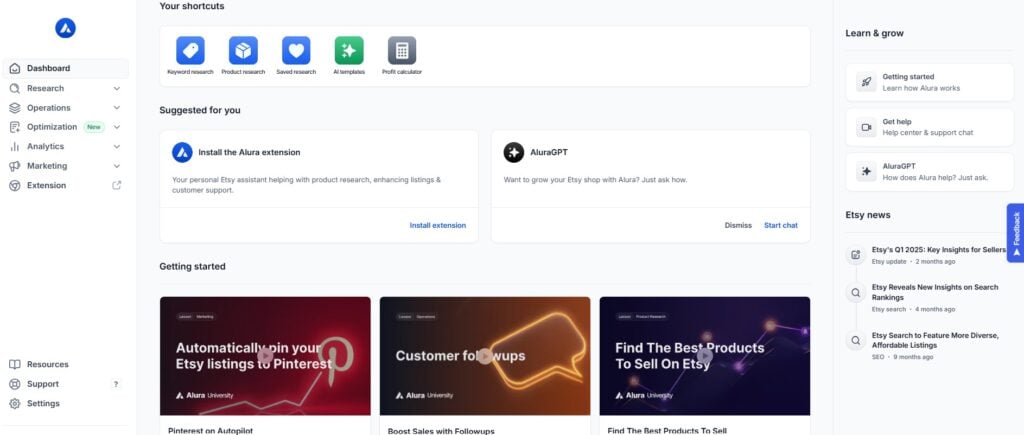
Alura is basically your all-in-one Etsy research tool. It’s built to help sellers like us do everything from finding high-demand product ideas to fixing weak listings and even automating Pinterest and email. Tools you can find on Alura include:
- Keyword Finder – for digging up the right keywords that actual shoppers are searching
- Product Seeker – helps you spot what’s trending and selling right now
- Shop Analyzer – allows you to spy on your competitors’ best sellers and make competitor research
- Listing Helper – helps you audit your titles, tags, and descriptions so you can show up in search
- Chrome Extension – that overlays Etsy with sales data, tags, and performance scores
- Pinterest Automation – to auto-schedule Pins and get your listings seen off Etsy
- Email Sender – to follow up with buyers and drive repeat sales
- Review Insights – to pull common buyer feedback so you know what to improve
It’s basically marketed as the “everything tool” for serious Etsy growth, but let’s see how well that promise holds up.
My Favorite Alura’s Features
Alright, here’s where Alura actually delivers. I’ve tested a lot of Etsy tools, and these are the ones I keep coming back to inside Alura:
Keyword Finder
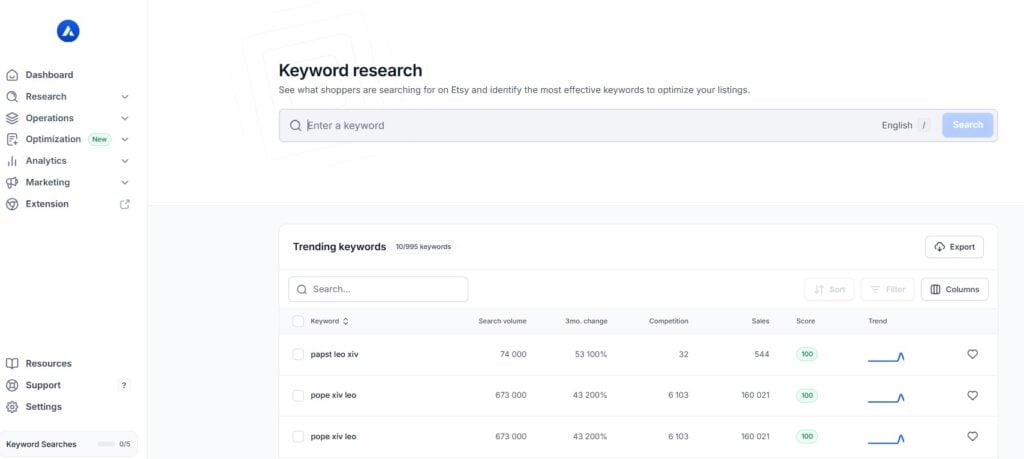
This one’s my go-to when I’m in brainstorming mode and totally stuck. It’s fast, super user-friendly, and helps me get over that annoying creative block when I don’t know what keywords to use. It shows data like views, favorites, and estimated sales across 1,000+ listings, so you can quickly compare keywords based on demand and competition. Super helpful for Etsy SEO without feeling overwhelming, especially if you’re just starting out.
But here’s the catch, like most Etsy tools, the data is estimated. It’s not coming straight from Etsy, so I never take it at face value. I always double-check by plugging those keywords into Etsy’s search bar to see if they show up in autocomplete and what kinds of listings come up. That’s how I make sure the keyword actually fits what I’m selling. Honestly, it works best when I combine it with eRank or Everbee to cross-check trends and spot bigger patterns. That’s where the real magic happens.
Chrome Extension
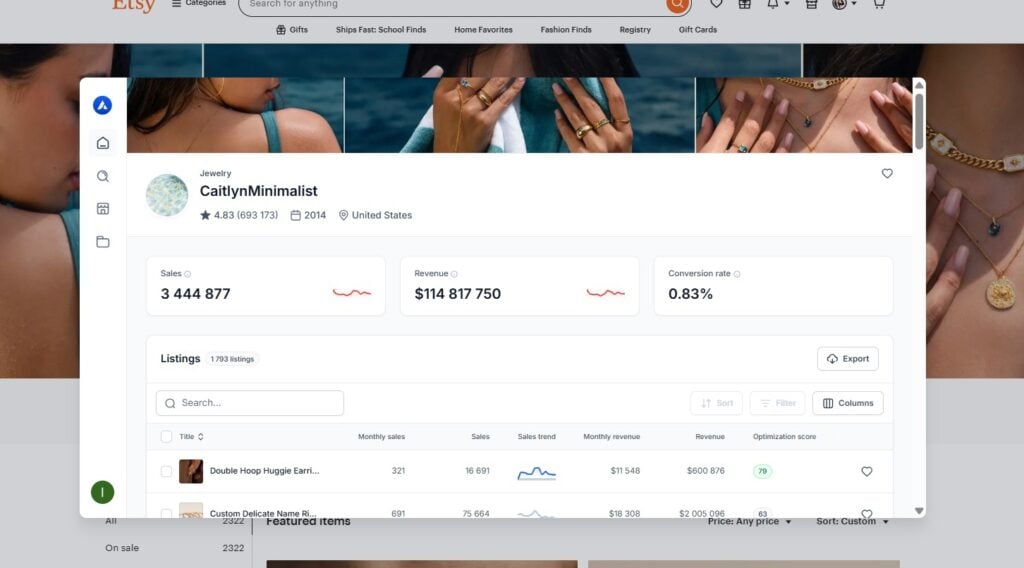
This one’s honestly a game changer. When I’m scrolling through Etsy, it shows me estimated sales, keyword scores, prices, and even which tags a listing is using, right there on the page. No need to open a bunch of extra tabs or copy-paste anything into a tool. It saves so much time, especially when I’m doing competitor research or trying to validate a product idea.
That said, the sales numbers and scores are just estimates, so I treat them as directional, not gospel. Still, it gives me a quick peek at what’s performing well and helps me figure out which listings are worth digging into. I like using it in incognito mode too, so the results aren’t influenced by my own search history. If you’re the kind of seller who likes researching while you browse (guilty), this feature’s super useful.
Shop Analyzer
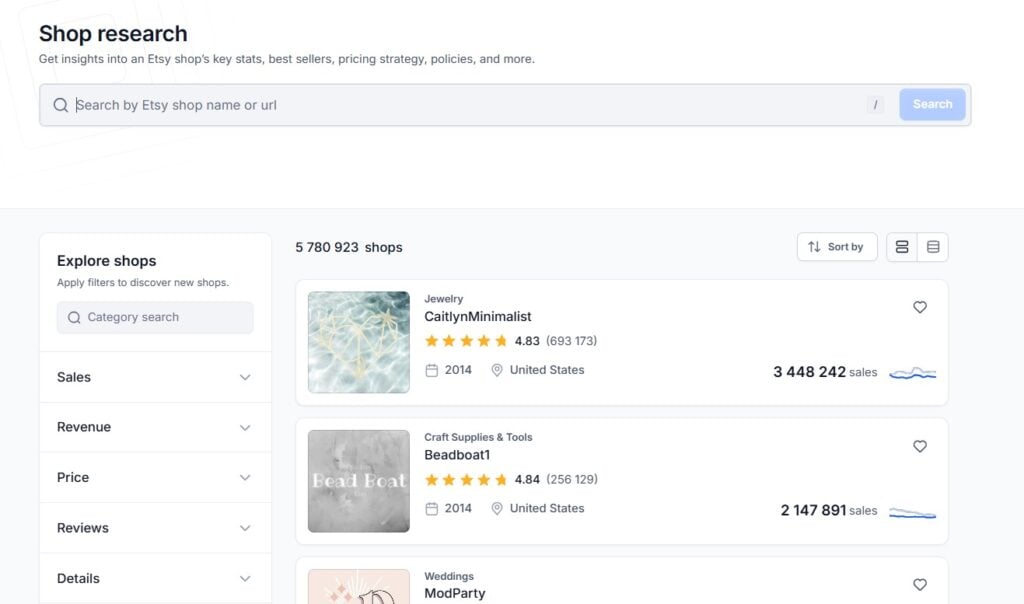
I love this one for friendly spying. When I want to see what’s working for other successful shops in my niche (or any niche I want to check), this tool lets me peek into their top listings, estimated revenue, and the exact tags they’re using. It’s super helpful when I’m researching trends or looking for inspo to improve my own listings.
But just like everything else with Alura, the numbers are based on estimates, so I don’t obsess over exact sales data. I use it more to spot patterns and track successful shops. If a shop has 3 listings with similar titles that are all ranking high, that tells me something. And seeing what kind of tags and price ranges they’re using gives me a baseline when I’m launching new products. It’s basically competitive research made easy, and way more efficient than doing it manually.
Listing Helper
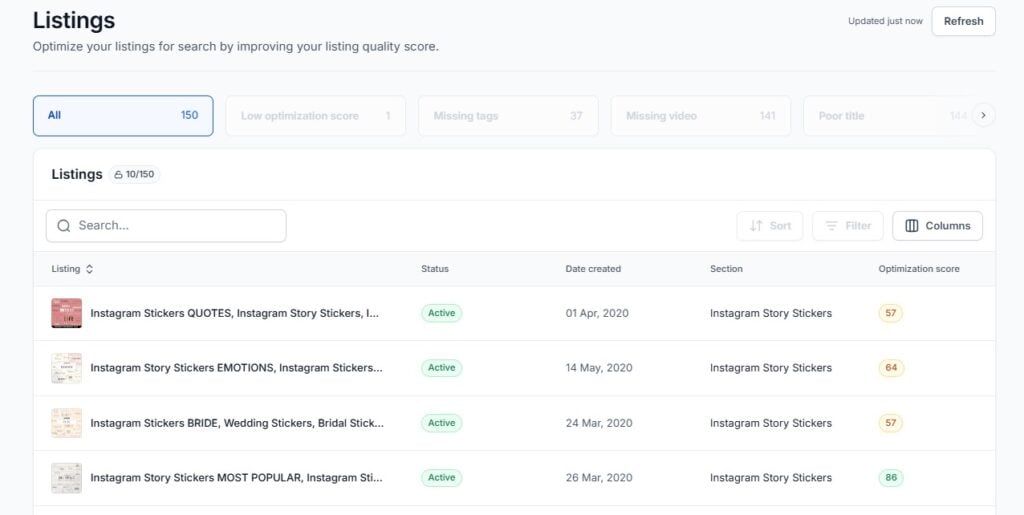
If you’re like me and want your product pages to actually show up in search, this tool’s a great place to start. It gives your listing a score and points out what to improve, titles, tags, descriptions, image count, even shipping settings.
It’s super beginner-friendly and helps catch stuff you might miss when uploading in a rush (which, let’s be real, happens). But I treat the score more like a guide than gospel. Just because it says a tag isn’t perfect doesn’t mean I’ll remove it – sometimes relevance matters more than the “grade.” I’ve also noticed that if your product is super niche or seasonal, the suggestions might feel a bit off, so I use it to tighten things up, not completely rewrite everything. Still, it’s a solid sanity check before I hit publish.
I’ve found this cool Alura review video to help you visualize the platform;
Where Alura Falls Short
Okay, let’s be honest, Alura isn’t perfect. One of the biggest complaints I’ve seen (and experienced) is that the keywords it suggests don’t always match what real buyers are actually searching for on Etsy. Some sellers reported that even their “green” tags – Alura’s top-rated keywords – performed poorly in Etsy search. That’s because the tool doesn’t have access to Etsy’s actual search volume, so it relies on estimates. Helpful? Sometimes. Accurate? Not always.
Another thing is that Alura’s tag grading system can actually backfire. It’s kind of discouraging when you use perfectly relevant tags, and the tool still gives them a low score. I’ve tested this myself and honestly got better results when I ignored the grades and just used what made sense for my product.
Another thing I’ve tested is the tag grading system and honestly, it can be more confusing than helpful. I used perfectly relevant tags for one of my listings, and Alura gave them a low score. At first I second-guessed myself, but I decided to stick with what actually made sense for the product… and it performed better than the “green-rated” ones. So yeah, sometimes the scores just don’t reflect what buyers are really searching for.
Related: 25+ Easy Wood Crafts To Make and Sell On Etsy
Here Are 5 Tips to Remember While Using Alura
Don’t trust the search volume numbers blindly. I use Alura a lot when I’m in brainstorm mode or doing competitor research, but I’ve learned to take the numbers with a grain of salt. They’re estimates, not actual Etsy data, so I always double-check what’s trending using the Etsy search bar or eRank. Also, when I’m using the Chrome extension, I always switch to incognito mode so the data isn’t skewed by my own search history.
Ignore the tag scores when they don’t make sense. Seriously, I’ve had listings perform better using relevant, niche tags that Alura marked as “poor.” Just because something isn’t green doesn’t mean it won’t work. I’ve found that trusting my gut and testing what actually works for my shop, beats any algorithm.
It’s a great tool for beginners, but not a complete strategy. I used it a ton when I was testing new ideas, but I always pair it with tools like Pinterest Trends, InsightFactory (or other Etsy tools), or even Google Trends or Ahrefs, especially for seasonal stuff like Halloween, when timing really matters.
And sometimes manual research still wins. One of the best things I do is type keywords into Etsy and see what pops up in autocomplete and how the top listings are optimized. It’s slower, but way more accurate than relying on any one tool. That’s also why I test Alura’s keyword suggestions myself before using them.
Use Alura as a helper, not the boss. It’s helpful, user-friendly, and saves time, but I don’t let it make decisions for me. I use it to get unstuck, research faster, and explore new ideas, but I always validate with real Etsy searches, especially using the Shop Analyzer to peek into what successful stores are actually doing.
Related: My Pinterest Strategy That Helps Me Drive Over 200k Sessions per Month To My Site
Alura vs. Other Etsy Tools
I’ve tried many popular Etsy tools at this point, and here’s how Alura compares to the rest:
Alura is great if you want an all-in-one platform, especially if you’re a beginner or just getting serious about growing your shop. It has a free plan, and I like that it includes tools for listing audits and email marketing in one place (the email sender is a nice touch most tools don’t offer).
eRank is what I reach for when I’m deep in SEO mode. It’s packed with keyword tools and filtering options for long-tail keywords. Also free to start, and super detailed if you’re obsessed with search data like I am.
Marmalead is a more advanced SEO tool focused on keyword research. It doesn’t have a free plan, but what sets it apart is its ability to forecast engagement and give scoring that feels more realistic, though again, all of these are just estimates.
EverBee is my go-to for spotting trending products fast. The Chrome extension shows live overlays right on Etsy, which is great for competitor research. It has a free plan too, and I mostly use it to validate product ideas before I go all in.
InsightFactory is the tool I turn to when I’m chasing fast-moving trends or niche ideas. It doesn’t offer a free plan, but it’s really strong for tracking what’s blowing up on Etsy and TikTok, which is gold if you’re trying to stay ahead of the curve.
Bottom line? Alura is solid for managing everything in one place, but I still use it alongside these other tools depending on what I’m working on.
Final Verdict: Is Alura Worth It?
If you’re just getting started or want everything in one clean dashboard, Alura’s honestly a solid pick, especially if you’re on the free plan or just need it for a month while revamping your shop. It’s fast, beginner-friendly, and helps you move through listing tasks without getting overwhelmed.
That said, it’s not a magic fix. I’ve seen the best results when I treat it as a helper, not the whole strategy. If you’re a data nerd or care a lot about real Etsy search trends, definitely use it alongside tools like eRank, Everbee, or even good old Etsy autocomplete.
Bottom line? Use it to get unstuck, spark new ideas, and tighten up your listings, but don’t expect it to do the heavy lifting alone. Your creativity, judgment, and testing will always be the real secret sauce.